



Key Takeaways
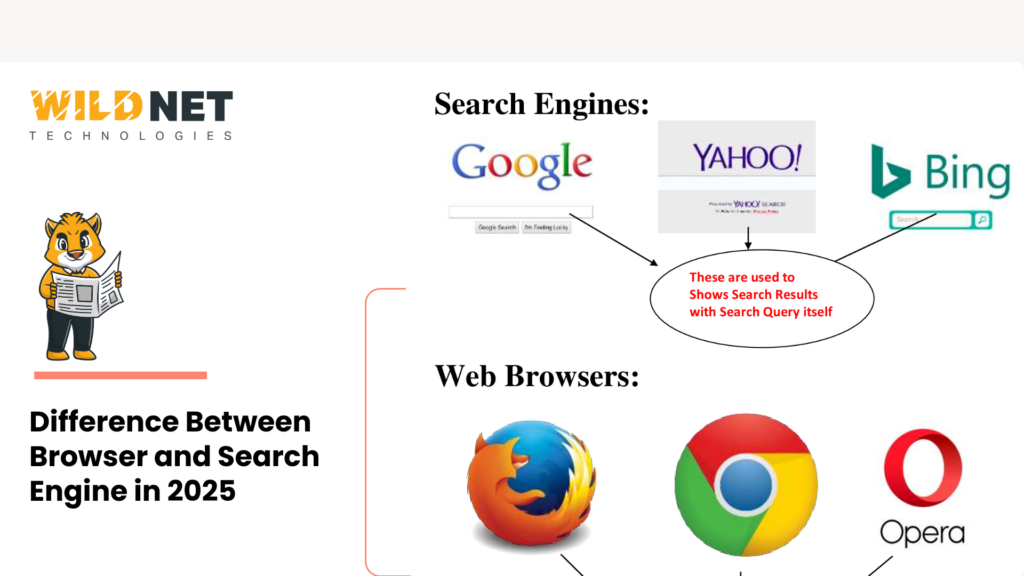
- The difference between browser and search engine is that a browser is software that accesses and displays web content, while a search engine is a tool accessed through that browser to find specific information
- What is a web browser: an application like Chrome, Firefox, or Safari that fetches HTML, CSS, and JavaScript files from web servers and renders them as viewable pages on your device
- What is a search engine: a platform like Google or Bing that crawls the web, indexes content, and ranks pages by relevance to return results for user queries
- Browser vs search engine confusion is common because browsers like Chrome have built-in search engines in their address bars, making the two appear as a single tool when they are functionally distinct
Introduction
Most people use a browser and a search engine simultaneously without distinguishing between the two. That overlap creates genuine confusion: is Google a browser or a search engine? Is Chrome the tool doing the searching? The difference between browser and search engine matters not just for general digital literacy but for anyone building a website, running SEO campaigns, or optimising content for online visibility. Understanding how each works, and how they collaborate, clarifies how the internet actually delivers information from a server to a screen.
What Is a Web Browser?
A web browser is a software application installed on a device that retrieves and displays web pages. When you type a URL into the address bar, the browser sends an HTTP or HTTPS request to the website’s server, receives back HTML, CSS, JavaScript, and image files, and renders them into the visual page you interact with.
Most widely used browsers in 2026:
- Google Chrome: fastest adoption, extensive extension library, Google account integration
- Mozilla Firefox: open-source, strong privacy defaults, independent of major tech platforms
- Microsoft Edge: optimised for Windows, built-in AI features via Copilot integration
- Apple Safari: native to macOS and iOS, best performance on Apple hardware
- Brave: privacy-first with built-in ad and tracker blocking
What is a web browser in practical terms: it is the vehicle. It does not decide where information lives on the internet; it simply retrieves and displays whatever destination you direct it toward.
What Is a Search Engine?
A search engine is an online tool that helps users find specific information across the web without needing to know exact URLs. It operates through three core processes:
- Crawling: Automated bots called spiders or web crawlers continuously scan the internet, following links from page to page to discover new and updated content
- Indexing: Crawled content is processed and stored in a massive database, catalogued by topic, keyword, authority, and hundreds of other signals
- Ranking: When a user submits a query, the search engine’s algorithm evaluates indexed pages and returns the most relevant results as a Search Engine Results Page (SERP)
Major search engines and their primary markets:
- Google: dominant globally, highest index depth and AI integration
- Bing: Microsoft-owned, rewards-based search, powers several third-party engines
- DuckDuckGo: privacy-focused, no personal data storage or user tracking
- Yahoo: search combined with news and content aggregation
- Baidu: primary search engine in China
- Yandex: dominant in Russia and several CIS markets
What is a search engine in practical terms: it is the library catalogue. It does not display the books; it tells you exactly where to find the one you need.
Browser vs Search Engine: Key Differences
| Dimension | Browser | Search Engine |
| Definition | Software to access and display websites | Tool to find information across the web |
| Examples | Chrome, Firefox, Safari, Edge, Brave | Google, Bing, DuckDuckGo, Yahoo, Baidu |
| Input type | URL (web address) | Keywords or natural language queries |
| Core function | Fetches and renders web content | Crawls, indexes, and ranks web pages |
| Where it lives | Installed on device | Accessed through a browser |
| Works without the other | Yes, if URL is known | No, always accessed via a browser |
How Browsers and Search Engines Work Together
The reason browser vs search engine confusion is so widespread is that the two tools are deeply integrated in daily use. The practical workflow runs as follows:
- You open Chrome (the browser)
- You type “best smartphones under ₹30,000” into the address bar
- Chrome sends that query to Google (the search engine set as default)
- Google returns a SERP with ranked results
- You click a result link
- Chrome fetches and renders that web page
The address bar in most modern browsers doubles as a search input field, which is the single biggest source of confusion between the two. Technically, the browser is handling step one and steps five through six, while the search engine is handling steps three and four. They are collaborating, not performing the same function.
Choosing the Right Browser and Search Engine
The best combination depends on whether performance, privacy, or platform integration is the priority:
For performance and convenience: Chrome with Google delivers the most seamless experience with the broadest ecosystem compatibility, though it collects significant user data.
For privacy: Brave browser with DuckDuckGo search eliminates ad tracking, blocks third-party cookies by default, and stores no personal search history.
For Windows integration: Microsoft Edge with Bing offers built-in AI features, PDF tools, and native Windows performance advantages.
For Apple device users: Safari with Google or DuckDuckGo provides the best battery efficiency and hardware optimisation on Mac, iPhone, and iPad.
Why This Matters for Business and SEO
For businesses, the difference between browser and search engine is not just technical trivia. Search engines are where buyers, clients, and users discover websites; browsers are where they experience them. A business must perform well on both fronts:
- SEO ensures your website ranks on search engine results pages so users can find you during the crawl, index, and ranking process
- Web development and cross-browser compatibility ensure your site renders correctly across Chrome, Firefox, Safari, and Edge once users arrive
Optimising for search engines without ensuring browser performance means earning visibility that delivers a broken experience. Optimising browser performance without earning search visibility means building a site no one discovers.
Conclusion
The difference between browser and search engine comes down to function: browsers access and display the web; search engines help users find what they are looking for within it. What is a web browser is a retrieval and rendering tool. What is a search engine is a discovery and ranking system. Both are essential, and for any business with an online presence, performing well in both dimensions — organic search visibility and seamless cross-browser experience is what separates brands that get found and trusted from those that do not.
Over 20 years, Wildnet Technologies has grown from a digital marketing firm into a full-stack, AI-native growth partner with 350+ in-house experts, 2,100+ projects delivered globally, and a track record of turning brands into market leaders. We don’t just run campaigns; we build digital ecosystems.
Ready to grow? Here’s how we can help:
SEO Services: We go beyond rankings. Our SEO strategies combine technical precision, AI-driven insights, and content authority to put your brand in front of the right audience at the right moment consistently.
Web Development Services: We build fast, cross-browser-compatible websites engineered for performance, user experience, and search engine discoverability from the ground up.
Digital Marketing Services: From awareness to conversion, we build full-funnel digital strategies tailored to your industry, audience, and growth stage so every rupee you spend works harder.
Great digital marketing doesn’t cost you money — it makes you money.
FAQs
1. What is the difference between browser and search engine?
A browser is software that accesses and displays websites; a search engine is a tool used to find information across the web. Browsers render content; search engines discover and rank it.
2. Is Google a browser or a search engine?
Google is a search engine. Google Chrome is the browser. The two are separate products: one finds information, the other displays it.
3. Can you use a browser without a search engine?
Yes. If you know the exact URL of a website, you can type it directly into the browser’s address bar and access the site without using a search engine at all.
4. What is the best browser for privacy?
Brave and Mozilla Firefox offer the strongest privacy defaults, blocking trackers and third-party cookies. Paired with DuckDuckGo as the default search engine, they provide a fully privacy-first browsing experience.
5. Do all search engines work on all browsers?
Yes. Google, Bing, DuckDuckGo, and other search engines are accessible through any modern browser. Most browsers also allow you to set your preferred default search engine in settings.
Read More
- When Should You Hire a Search Engine Optimizer for Your Business?
- How Search Engine Marketing Intelligence Drives Better Results
- Search Engine Metrics For SEO Success in 2026
- How to Increase Search Engine Optimization on Google
