



As an SEO pro, it’s a high chance that you must’ve been more inclined toward learning and optimizing for Google. No one’s pointing fingers at you.
After all, Google has earned that place of being the most popular search engine. But there are many more out there to explore and reach farther. One of them is Bing.
Yes, Bing, the second most popular search engine by Microsoft, offers you an opportunity to manage your SEO.
Bing powers search results across Microsoft Edge, Yahoo, DuckDuckGo, Copilot, ChatGPT and more. With a unique user base, often high-purchase power and untapped by Google strategies, optimizing for Bing is smart, practical, and effective.
What are Bing Webmaster Tools?
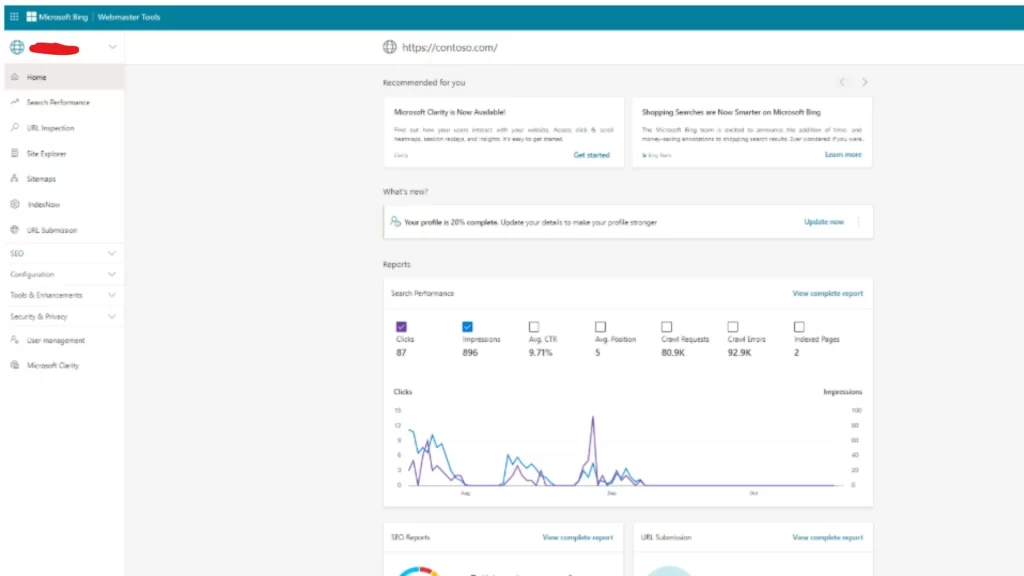
Fig 1.1 Screenshot of Bing Webmaster Tool Dashboard
Bing Webmaster Tools (often called Bing console or Bing search console) is a free platform by Microsoft that lets you monitor, audit, and optimize how your site performs on Bing search.
While similar to Google Search Console, it has distinct features and fresh insights that matter greatly, for Bing visibility and general SEO health, especially in the AI era.
Why SEO Pros Should Care About Bing Webmaster Tools
1. Tap into search traffic you’d otherwise miss
Though smaller than Google, Bing still drives meaningful clicks. Many users report up to 3× more site visitation and clicks compared to search ads. Bing also powers traffic for ChatGPT and Microsoft Copilot, if your pages rank in Bing, they may be surfaced via these AI layers too. The best digital marketing company in Delhi, like ours, will always tell you to give your due attention to Bing as well.
2. Gain unique, Bing-specific SEO signals
Bing Webmaster provides diagnostics, crawl/index data, backlink visibility and site structure insights that Google simply doesn’t share. Because it draws directly from Bing’s index, you’re seeing how Bing, not Google, perceives your site. This independent viewpoint helps you catch issues or opportunities missed by GSC.
3. More data history, actionable AI recommendations
Bing Webmaster recently expanded data retention from 6 to 16 months, helping you identify longer-term trends, seasonality, campaign effects, etc. The “Recommendations” dashboard surfaces prioritized, actionable fixes. And the integrated Copilot assistant can help troubleshoot, surface insights, and simplify navigation.
4. Instant indexing with IndexNow
Traditional crawling can be slow or hit crawl-budget limits. IndexNow, supported within Bing webmaster tools and many CMS platforms, enables instant URL submission when content is added, updated, or removed. An IndexNow Insights report (added in 2024) shows which URLs were submitted, indexed, and how fast Bing responded.
5. Powerful technical and on-page tools (all free)
Bing offers several built-in diagnostics under the Bing console, more than many expect. These include:
- Site Scan: scans up to 10,000 pages/month for broken links, missing meta tags, duplicate titles, headings, canonical issues etc.
- SEO Reports: flag on-page issues like missing or duplicate titles/descriptions, missing alt text, schema errors.
- Mobile Friendliness Test, Fetch as Bingbot, Markup Validator, Verify Bingbot, Site Move,Robots.txt Tester and more, tools that help ensure crawlability, usability and indexing.
- URL Inspection: Lets you analyze indexing status, HTTP codes, blocked resources per URL.
- Backlink Insights: See referring domains, anchor texts, even competitors’ backlinks (to some extent), directly from Bing’s index.
6. Security & crawl monitoring
Bing webmaster tools alerts you to malware/security issues and crawl problems such as 404 errors or blocked resources. Having visibility in Bing lets you see if a problem is search-engine-specific (Google-only) or universal.
7. Better user data via Clarity integration
Bing Webmaster Tools integrates with Microsoft Clarity, offering session recordings and heatmaps to see how users actually interact with your pages, valuable UX and SEO insight.
Practical SEO Benefits: How Bing webmaster tools Helps You Optimize
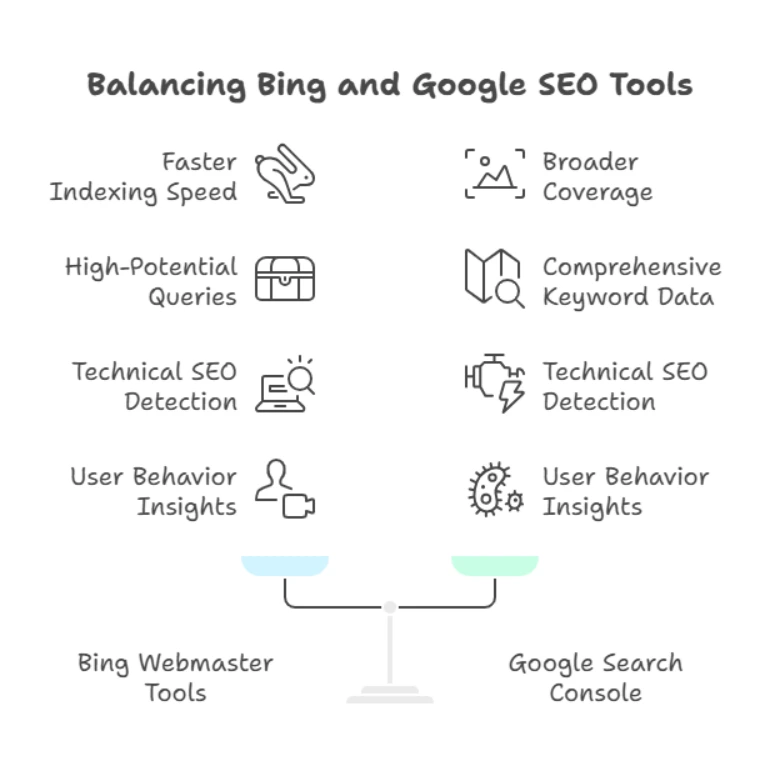
Fig 1.2. Infographic showing a comparison between Bing Webmaster & Google Search Console
Control how Bing crawls & indexes your site
Submit sitemaps, test robots.txt, fetch as Bingbot, inspect URLs. Avoid crawl failures. Use Crawl Control to schedule visits or prevent bots hitting staging pages.
Speed up indexing with IndexNow
When you add or update pages, send them instantly via IndexNow so Bing sees them right away, useful for blogs, news, product launches, events, etc. No waiting weeks for Google-style crawling.
Find high-potential queries & pages
Use Search Performance and Keyword Research to see which keywords bring impressions, clicks, positions, queries, long-tail suggestions per country/device. Compare performance over seasons or campaigns. Use these insights to optimize content or target new keywords.
Technical SEO issue detection
Run Site Scan or SEO Reports to spot missing meta titles/descriptions, broken links, duplicate content, missing alt text, canonical errors, markup errors. Fix them to help crawlers and users alike.
Backlink analysis & disavowal
Study your own backlink profile, domains, anchor text, page-level links. Also review competitor backlinks to inform link-building strategy. Disavow toxic links if needed via Disavow Tool.
Understand user behavior
Microsoft Clarity shows session recordings, heatmaps, rage clicks, scroll maps. Combine this with SEO data to optimize UX, page layout, CTAs, and content readability.
Monitor security & health
Receive alerts when malware or possible security issues are detected, check crawl faults, server errors, blocked resources, take action promptly.
Target content strategically
Use keyword insights and performance history to tailor content by region, language, device. Use geographic targeting in Bing Console to focus SEO regionally.
Complement Google SEO efforts
Many users mention that having both Google Search Console and Bing webmaster is common and sensible, they offer two sets of signals, helping you catch edge-cases and broaden coverage.
Common Pitfalls & Pro Tips
“Nothing gets indexed”
Some users experience indexing delays or conflicts when using multiple webmaster tools, but most are resolved by resubmitting sitemap, using IndexNow, checking robots/meta tags, and reaching out to Bing support if needed. Always ensure no noindex, clean sitemap, mobile usability, etc.
Keep using both platforms
It’s perfectly OK to use Bing webmaster tools, Bing search console, and GSC together. You can even import site data from Google to Bing for easy setup.
Use Site Scan proactively
Many SEOs don’t realize Bing offers free site-wide SEO audits, for up to 10k pages/month. Use it monthly or after large updates to catch issues before they hurt rankings.
Don’t ignore backlink data
Unlike Google, Bing gives fuller backlink insights. Use it to monitor your link profile and your competitors’. Reject spammy links if needed.
Take AI-driven insights seriously
Copilot integration and actionable recommendations help you prioritize fixes and understand what matters for Bing’s evolving algorithms (now more AI-driven).
Track long-term trends & seasonality
With 16 months of data, you can compare year-over-year performance, seasonal changes, campaign effectiveness and more. This helps you set real benchmarks and goals.
Step-by-Step: Getting Started with Bing Webmaster Tools
Step 1: Sign in to Bing webmaster tools
Go to Bing.com/webmasters, sign up using Microsoft, Google or Facebook accounts. Import your site easily if already verified in Google Search Console.
Step 2: Add and verify your site
Via Domain Connect (recommended), uploading a verification file, meta-tag, or DNS TXT record. Or import directly from Google Search Console.
Step 3: Submit sitemap & enable IndexNow
Submit your XML sitemap. Enable IndexNow via plugin, CMS or manually. Monitor IndexNow Insights to ensure Bing indexes your updates quickly.
Step 4: Explore performance reports
View clicks, impressions, CTR, positions. Filter by page, query, device, country, period up to 16 months. Combine with Keyword Research tools for optimization ideas.
Step 5: Run Site Scan & SEO Reports
Identify on-page SEO issues. Export lists, fix titles, descriptions, missing alt tags, canonical tags etc.
Step 6: Inspect individual URLs
Use URL Inspection to check indexing, HTTP status, blocked resources, structured data, etc.
Step 7: Review backlinks & competitors
Check referring domains, anchor texts, link counts. Export CSV. Compare competitor profiles to identify link opportunities. Disavow harmful links
Step 8: Test mobile-friendliness & markup
Use built-in testing tools to verify your site is mobile-friendly and structured data is valid.
Step 9: Check security & crawl health
Review crawl faults, malware warnings, server errors. Use crawl control to adjust bot behavior if needed.
Step 10: Activate Microsoft Clarity
View user sessions, heatmaps, rage clicks, scrollmaps to improve UX and page layout informed by real behavior.
Step 11: Use Recommendations & Copilot
Let AI-driven suggestions guide your next steps. Prioritize critical fixes, optimization opportunities, keyword gaps or backlink needs.
Conclusion
Bing Webmaster Tools (also known as Bing console or Bing search console) isn’t just a secondary tool, it’s a rich, free SEO platform packed with diagnostics, indexing control, keyword data, backlink analysis, AI-assistance, and behavioral insights.
Even if your primary focus is Google, becoming familiar with Bing Webmaster Tools gives you:
- Unique data and corrective signals
- Faster indexing via IndexNow
- Opportunity for incremental, high-quality traffic
- A complementary, holistic SEO view
- Tools and suggestions tailored to Bing’s AI-powered ranking system
In short, for anyone serious about SEO, even content creators, marketers or small business owners, Bing Webmaster tools are a smart, practical and often under-utilized resource. Making it part of your regular toolkit alongside Google Search Console helps you optimize not just for search, but for search in 2025+, where AI, speed, structure and relevance reign.
We get it, it’s too much! But, you have nothing to worry about when you choose Wildnet Technologies, the best SEO marketing company in India, for this job. So, why wait? Connect now!
FAQs
1. What is Bing Webmaster Tools and why should I use it?
A free platform from Microsoft that helps you monitor, optimize, and control how your website appears in Bing search results, covering indexing, SEO diagnostics, backlinks, performance data, and more.
2. How do I set up and verify my website in Bing Webmaster Tools?
You can verify using: Domain Connect, XML file upload, DNS TXT record, meta tag, or import directly from Google Search Console (usually completed within ~48 hours).
3. How can I speed up indexing of new or updated content?
Use the URL Submission feature or IndexNow, which instantly notifies Bing and partners when content changes, no waiting for traditional crawling.
4. What does the Search Performance report show?
It displays clicks, impressions, click-through-rate, average ranking position, queries, and landing pages, with filters for device, country, and custom date ranges (up to 16 months).
5. How can I use Bing Webmaster Tools to fix SEO problems on my site?
Run Site Scan and SEO Reports to detect broken links, missing metadata, duplicate titles, canonical errors, markup problems, and more, free up to 10,000 pages/month.
6. Can I analyze backlink profiles?
Yes, view referring domains, anchor texts, linking pages (up to limitations), and even compare competitor backlink profiles to guide your link-building strategy.
7. What tools are available to troubleshoot crawling issues?
Use URL Inspection, Robots.txt Tester, Site Explorer, Crawl Control, and Block URL tools to ensure Bingbot can access, crawl, and properly index the right content.
8. How does Bing Webmaster Tools help with security monitoring?
You’ll receive alerts about malware, phishing, or crawl errors. There’s also a copyright removal notices feature to see DMCA takedowns and appeal them if needed.
9. What user behavior insights can I gain?
Thanks to Microsoft Clarity integration, you can access heatmaps, session recordings, scroll maps, rage-click data and more, right within Bing Webmaster Tools.
10. Is it okay to use both Bing Webmaster Tools and Google Search Console?
Absolutely, it’s common practice. Bing lets you import your site from Google Search Console, and having both gives you broader signals, faster indexing, and complementary insights.
Read More:
- Google vs Bing: Search Engine Comparison for 2024
- Bing AI Image Generator: How It Works and What It Can Do for You
- How to Use Google Analytics? (Learn From Scratch)
- How Do You Do Competitor Keyword Gap Analysis for PPC?
